One click to share, three new columns for deeper insight – two improvements that simplify your workflow
05.06.2025
A typical day in the Insights Hub starts with a familiar thought: “I should share these Custom Markets with my team.” In the past, that meant sending out deeplinks, hoping everyone would open them – and always having to include the full configuration. Now? One click, a few checkmarks – and the markets appear directly in your colleagues’ overviews, exactly where they’re needed.
Later, when exporting from OTC Insights: where there used to be only aggregated totals, differences now become visible. Statutory (GKV), private (PKV), and self-pay (BAR) segments – clearly separated, transparently labeled, and ready for your next analysis.
This iteration brings greater clarity and efficiency.
Share custom markets – directly where they are created
Until now, sharing within Custom Market Management was only possible via individual deeplinks – functional, but not exactly convenient. With this release, that process becomes seamless: multiple Custom Markets can now be shared directly within the Custom Market Management area with colleagues from the same tenant.
Simply select the markets, define the recipients – and the shared Custom Markets instantly appear as references in the recipients’ own overviews. Already shared markets are recognized and won’t be duplicated. A new column clearly displays who has access to each market. Additional filter and action options ensure a clear view – even with a large number of markets.
Sharing becomes faster, clearer, and more manageable – exactly where it matters.
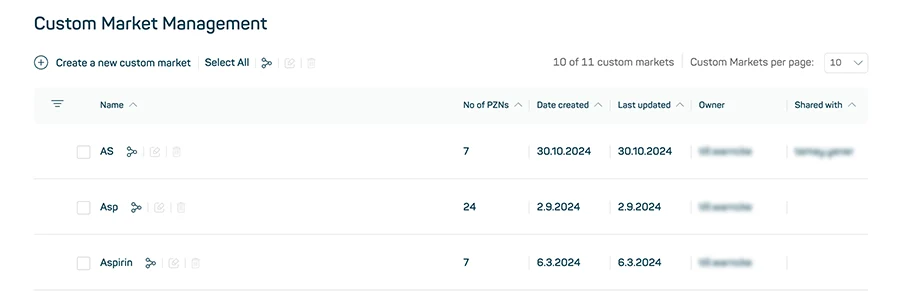
Image 1
Split by payers (GKV, PKV, BAR) at a glance – directly in Custom Download
In day-to-day work, it’s often not just about the “what” – but also the “where from.” Previously, if you wanted to break down sales and volume data by payer type, you had to run your own analysis. Now, the Custom Download in Insights Hub provides this breakdown automatically.
For the OTC Insights dataset, three new dimensions are now available: Sales rAVP, Sales APU, and Units – each with the addition “Split by payer.” If one of these dimensions is selected in the configuration step, the export file will automatically include three additional columns – one for each payer group. All values are shown as absolute figures – clearly separated and ready for direct analysis.
| Dimension | New columns in the downloaded file |
| Sales rAVP (Split by payer) | sales_gkv, sales_pkv, sales_bar |
| Sales APU (Split by payer) | sales_apu_gkv, sales_apu_pkv, sales_apu_bar |
| Units (Split by payer) | units_gkv, units_pkv, units_bar |