Merging and Standardization of POS Lists and Custom Markets
08.10.2024
With the latest update, we are merging the concept of Custom Markets in OTC Insights with POS Lists from the POS Insights module. This means that you can now create and use the already defined Custom Markets in POS Insights the same way you do in OTC Insights. Newly created Custom Markets will now be available across both modules (in POS Insights and OTC Insights within the Market Overview).
What has changed?
Previously, you could create POS Lists in POS Insights and Custom Markets in the Market Overview. These POS lists and Custom Markets were stored separately, meaning they could only be accessed in their respective sections. Now, Custom Markets have been merged and standardized across both POS Insights and the Market Overview. From now on, all created Custom Markets and POS Lists will be available in both areas, ensuring seamless access and usage.
How do I create a custom market from now on?
The process of creating a Custom Market in the Market Overview remains unchanged. As before, you can open the Custom Market dialog by clicking the “+” symbol and choose between the “By search” or “By copy and paste” tabs (see Image 1).
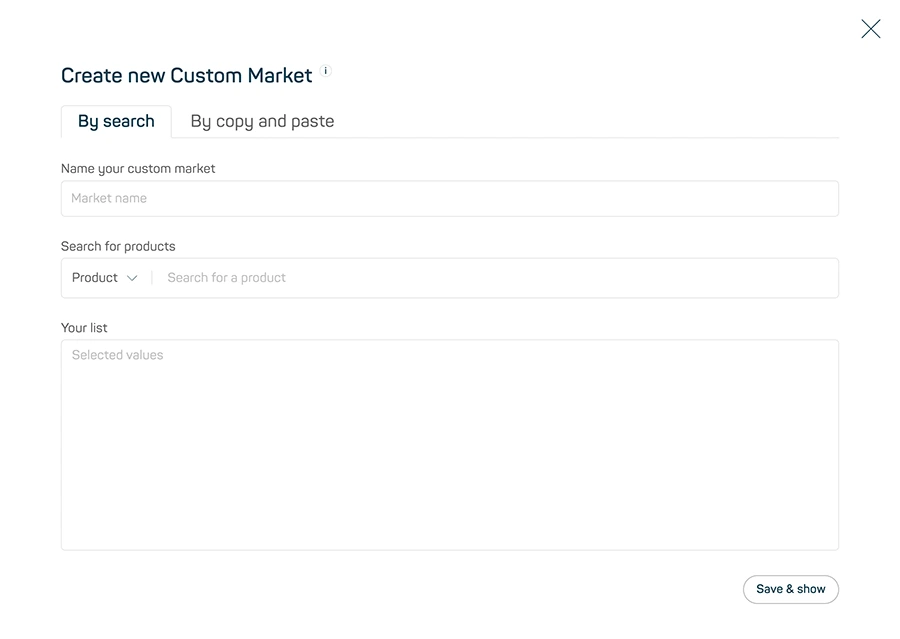
Image 1
However, the option to create a custom market in POS Insights the same way as in the Market Overview is new. Here a “+” symbol has also been added, enabling the quick creation of a Custom Market, similar to the Market Overview (see Image 2). Once a Custom Market is created, it will automatically be available in both areas (POS Insights and the Market Overview).
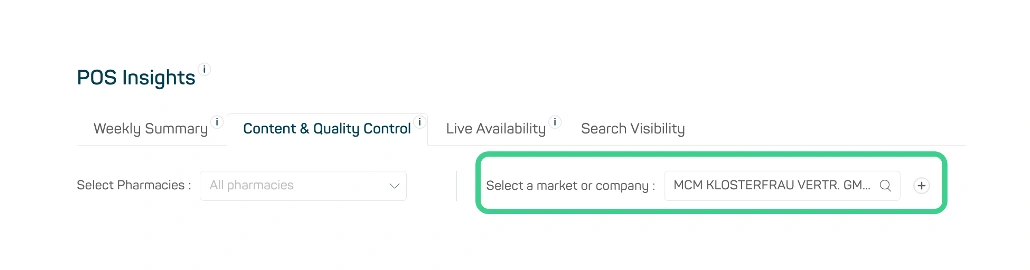
Image 2