Custom Markets
28.05.2024
The latest update to Insights Hub introduces a powerful new feature: Custom Markets
This functionality empowers users to create and manage their individual markets dynamically, reflecting changes in product groups and brands. With Custom Markets, users can gain deeper insights and perform comprehensive analyses tailored to their specific needs.
What are the benefits of Custom Markets?
- Dynamic Market Management: Effortlessly create and manage custom markets that update automatically with changes in product groups and brands.
- Tailored Insights: Customize market definitions to focus on specific brands, product groups, or individual products, providing targeted and relevant data.
- Comprehensive Analysis: Utilize custom markets for detailed performance tracking and market ranking, offering a broader and more precise view than standard market definitions.

How to create a Custom Market?
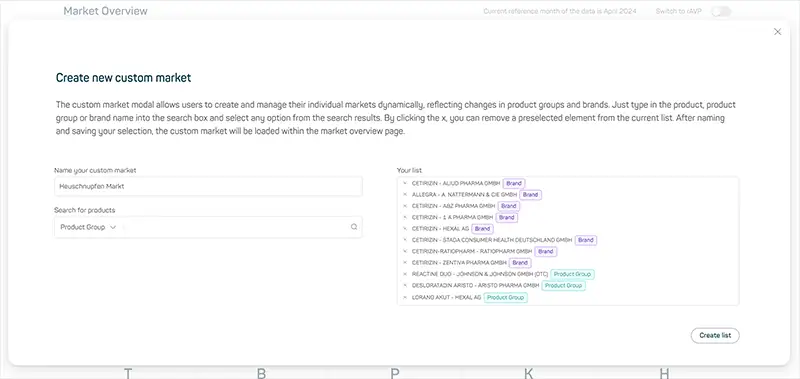
First, select one of the following grouping options within the drop-down menu > „Search for products“. Options are: Product, Product Group, or Brand. Enter then the name of the brand, product group, or product in the search bar. As you type, suggested results will appear below the search bar. Click on the desired result from the suggestions. Your selection will appear with its name and the company within the results list > „Your list“ along with a flag indicating the grouping level (brand, product group or product) ready to be included in your market definition.
Next, enter a unique name for your custom market in the designated field „Name your custom market“. The „Create Market“ button will become clickable once a unique name is entered. If the name field is empty or the name already exists, the button will remain locked. If you enter a name that already exists, the „Create Market“ button will change it label to „Overwrite list“, and a warning message will appear „! You are overwriting an existing configuration“. You will then have the option to either confirm overwriting the existing custom market or enter a new name to save as a different custom market definition.
Once you made your choice, click the „Create Market“ button at the bottom right. A popup will signal the successful creation of the market. The Insights Hub saves your custom market definition, ensuring the market dynamically updates with changes.
How do the widgets on Market Overview page behave?
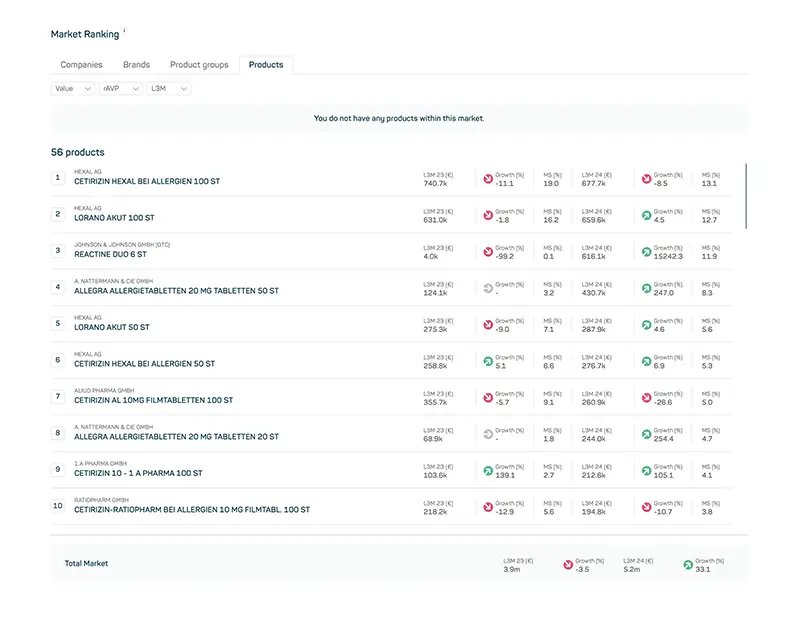
The Market Overview page allows you to view all included brands, product groups and products from your custom market definition at the product level. Widgets such as Executive Summary, Market Ranking, and Performance Tracker function seamlessly on individual markets just as they do for regular ATC markets, displaying values based on the associated PZNs in the custom market definition.
The sales values for the groupings by companies, brands, product groups, and the total market are derived from the individual PZNs defined in the custom market. Additionally, the new Products tab allows you to view the market rank at the product level. The enhanced Market Ranking widget removes also the limitation of the Top 100 on all levels, providing a more comprehensive view at all levels.
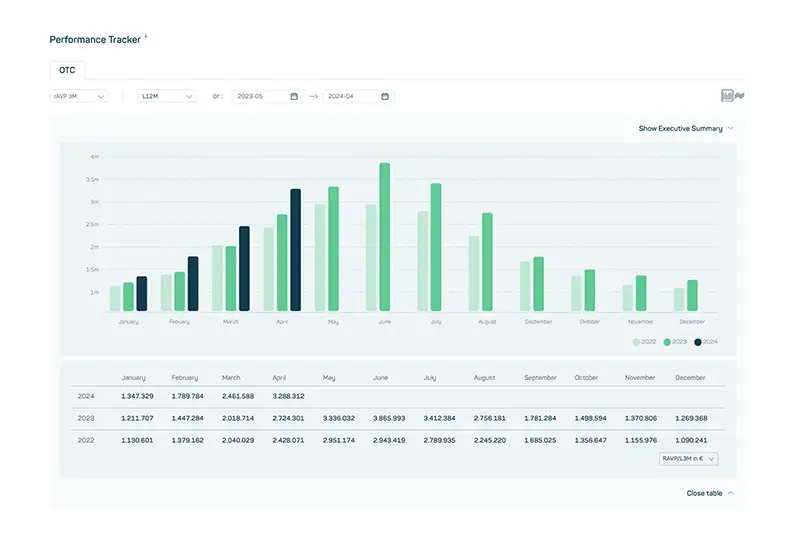
The Performance Tracker in the Custom Markets view is equivalent to the Performance Tracker in the ATC markets. The underlying PZNs are totaled for the common sales KPIs and can be displayed as a bar chart or line chart for the last 3 years. The table of values for a detailed view of the sales values is of course at the bottom of the Performance Tracker.
What are current limitations?
- There is currently no limit to the number of custom markets you can create and own.
- The dynamic definition of custom markets is currently limited to brands and product groups defined by DatamedIQ. The use of products is always a static definition and can serve to define an individual market more precisely.
- An existing custom market cannot currently be edited. However, as a workaround, it is possible to overwrite an existing custom market by creating a new definition with the same name. The name of a custom market is unique.
What are next iterations?
- Even if the advantages of using a dynamic market definition are clear, in a further iteration of the Custom Markets there will also be the possibility to define a static market consisting of a list of PZNs that can be inserted either via an upload file or directly via copy & paste from an Excel file.
- Also in the near future, you will be able to share individual views with colleagues within your company, including custom markets. This means that your unique market definitions can be easily shared with other colleagues within the Insights Hub.
By utilizing the Custom Markets feature, users can gain more in-depth and dynamic insights into their markets, ensuring comprehensive analysis and informed decision-making within the Insights Hub.