Executive Summary in POS Overview
14.07.2026
Our last release brought the first Executive Summary to POS Insights, in Search Visibility (see changelog from 23 June 2026). POS Overview (formerly Weekly Summary) now has one too.
It sits right at the top of the submodule and consolidates the key performance figures for the latest completed calendar week into one place: Availability, Category Visibility, Rebates, Ratings, rAVP and Total Ratings. The perspective is yours to choose: a toggle switches between brand and product group level, and every KPI expands from the view across all pharmacies down to a single one. A glance is enough to see which brands or product groups need attention. A click shows you why.
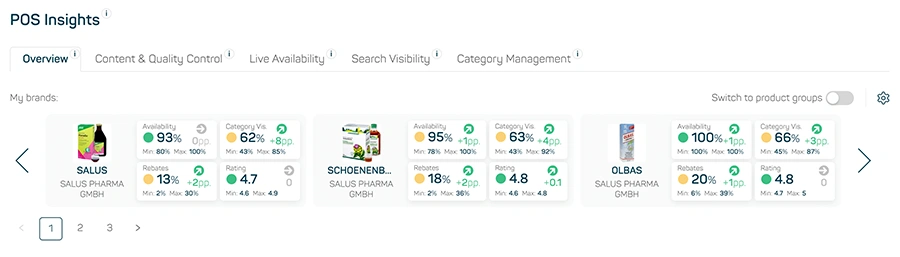
Image 1
Starting point: your top brands
When you open Overview, the Executive Summary shows your three highest-revenue brands side by side, sorted by Sales rAVP MAT, each on its own card. If your portfolio holds more than three, you page through them with the arrow. A toggle switches the whole view from brands to product groups, with the logic staying identical.
Each card carries one tile per KPI. By default, Availability, Category Visibility, Rebates and Ratings are selected. By clicking the gear icon you can put together your own set: up to six KPIs, in the order you want, so the card shows exactly what matters to you. Each tile answers four things:
| KPI value | The average for the brand or product group across all PZNs and pharmacies |
| WoW change | Change against the previous week, with a direction arrow |
| Traffic light | Green, yellow or red. Shows whether individual pharmacies are outliers |
| Min / Max | The lowest and highest value of a single pharmacy |
How the traffic light works
Every pharmacy is rated individually, and the tile shows the strictest case: one yellow pharmacy turns the tile yellow, one red pharmacy turns it red. So no outlier goes unnoticed, even when the average still looks fine. Two rule sets apply, depending on the KPI (rAVP and Total Ratings don’t carry a traffic light yet).
Availability, Category Visibility and Rebates are rated by deviation: how far a single pharmacy sits from the average across all pharmacies, in percentage points (pp). Direction matters here. For Availability and Category Visibility, only deviation below the average counts, a pharmacy above it stays green. For Rebates, both directions count.
| Deviation from average (Availability, Cat. Vis., Rebates) | Status |
| below 15 pp | green |
| 15 to below 30 pp | yellow |
| 30 pp and above | red |
Ratings are rated by fixed thresholds instead, since a poor rating is poor no matter what the average looks like.
| Rating | Status |
| 4.1 to 5.0 | green |
| 3.1 to 4.0 | yellow |
| 3.0 and below | red |
The rules will also be available in the info icon on the tile.
One level deeper: the pharmacy drilldown
Clicking a tile opens a full-width list underneath it, one row per pharmacy with its value and its deviation from the average. The list is sorted by severity, the most critical at the top. That takes you from „something’s off with this brand“ to „it’s these two pharmacies.“
At the end of the list, a link leads straight into the POS Performance Tracker for that brand or product group, pre-filtered to the same KPI.
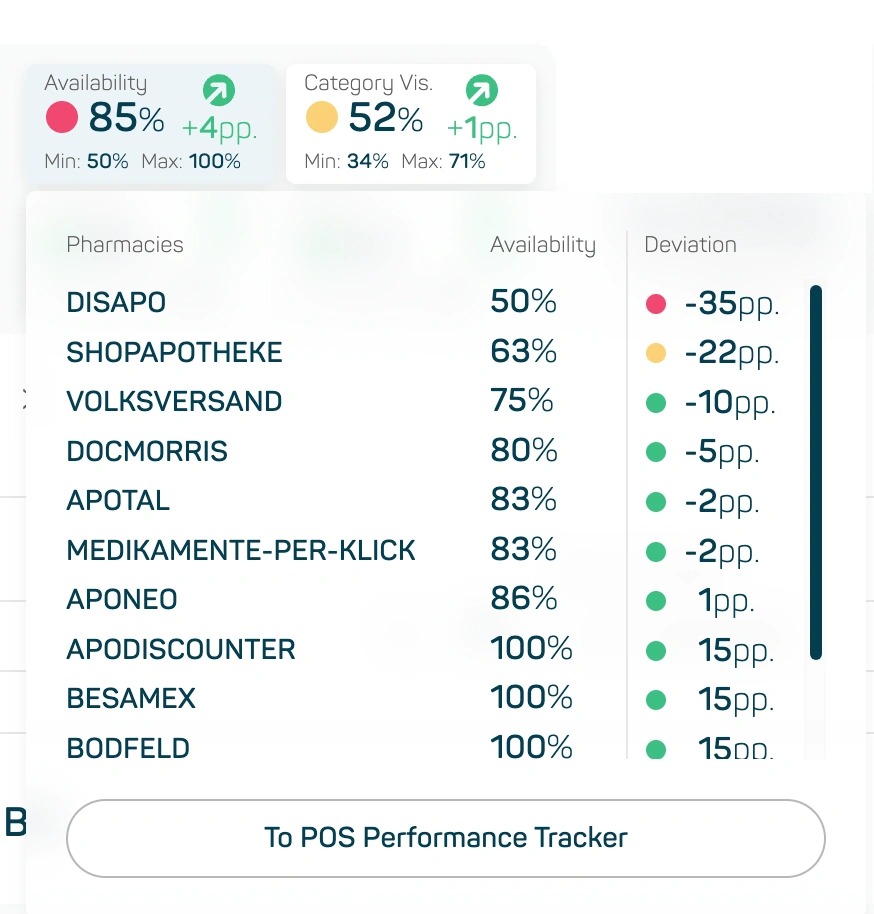
Image 2
Good to know
- The Executive Summary always reflects your own company’s data. Whichever market, companies or pharmacies you select further down in the submodule has no effect on it.
- No setup required. The summary is there as soon as you open Overview.
What’s coming next
After Search Visibility, Overview is the second submodule with its own Executive Summary. Live Availability is planned next. Step by step, all POS Insights submodules should get one.